Product info
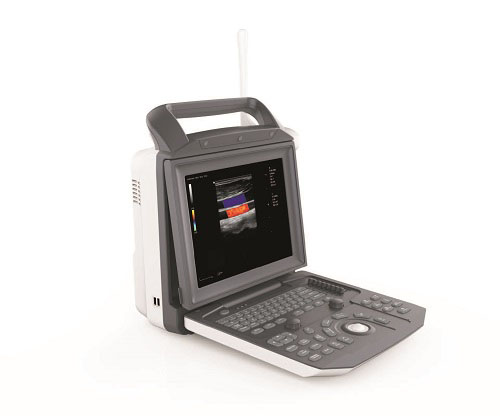
- Product name:Portable Color Doppler Ultrasound
- Product code:CCBM5
Out of stock.
Request a Quote
Packaging Specifications
Core Parameters
Description
CCBM5 Portable Color Doppler Ultrasound Brochure Summary (Markdown E-commerce Version)
Product Overview
Model: CCBM5 Portable Color Doppler Ultrasound System
Manufacturer: China Care Medical Equipment Co., Ltd
Slogan: Slimmer | Clearer | Stronger
Core core competitive advantage: Adopts 2nd generation uSeed CPU+GPU heterogeneous computing imaging platform, greatly improves imaging performance and expandability.
1. 2nd Generation uSeed Imaging Platform
uSeed Platform Diagram
Traditional vs uSeed Comparison
Core Technical Advantages
- Dual CPU+GPU parallel heterogeneous architecture, solves the signal loss defect of traditional fixed hardware beamformers; faster processing response, higher circuit integration.
- Stores complete RF raw metadata of ultrasound signals, supports offline secondary image optimization and re-measurement without re-scanning patients.
- High-fidelity raw data export for medical academic research.
- Modular plug-in expansion: Elastography, contrast imaging and other advanced functions can be upgraded via software without hardware replacement.
2. Full Series Compatible Probes & Wide Clinical Coverage
Full Probe Lineup
Supported Probes
Convex array, linear high-frequency small-part probe, endocavity transvaginal probe, volumetric 3D/4D probe, pediatric dedicated probes.
Applicable Clinical Departments
Abdomen, Gynecology (endocavity), Obstetrics, Cardiology, Small Parts (Thyroid, Breast, Testis), Urology, Musculoskeletal, Peripheral Vascular.
3. Advanced Image Optimization Algorithms
1. SRI (Speckle Reduction Imaging)
Suppresses scattered speckle noise, sharpens tissue boundary and echo texture for more accurate lesion identification.
2. FCI (Frequency Composite Imaging)
Combines fundamental wave penetration + harmonic high resolution, optimizes both near-field and far-field image detail & contrast simultaneously.
4. Professional Clinical Intelligent Functions
Cardiology Vascular Highlight: Auto IMT Measurement
Auto IMT Interface
One-click automatic carotid intima-media thickness measurement, auto calculates Max/Min/Mean/SD values, higher precision than manual operation, quickly evaluates cardiovascular risk factors.
Complete Multi-Mode Imaging
Includes B-mode, M-mode, CFM Color Doppler, PDI Power Doppler, PW/CW Spectral Doppler, multi-angle cardiac imaging, supporting full cardiac examination.
Cardiac Imaging Samples
5. Streamlined Efficient Operating Workflow
1. Customizable Exam Library
Probe & Exam Selection UI
Match dedicated exam templates for each probe (Adult Abd, Pediatric Abd, Gyne, Obstetric, Cardiac, Vascular, Kidney etc.), one-click switching.
2. Editable Measurement Package
Measurement Preset Page
Fully customizable measurement items for Abd/Cardio/Vascular/Gyne etc., supports adding/deleting/sequencing measurement parameters.
3. Simplified Control Logic
Integrated multi-function rotary knob + shortcut buttons for Gain, Depth, Focus, Baseline, PRF, Wall Filter; supports one-key auto image optimization.
6. Image & Patient Data Management
Multi-Image Preview & Storage
Image Review Gallery
Grid multi-frame thumbnail browsing; one-click save static images & cine video; supports bulk select/delete/export patient cases.
Raw Data Offline Editing
Stores complete ultrasound metadata; offline re-adjust image gain, dynamic range, add annotations & re-run measurements to regenerate reports without re-scanning.
Patient Archive Query
Patient Station Interface
Search patient files via Name/ID/Exam Date, quickly retrieve historical examination records.
7. Standard DICOM Full Compatibility
DICOM Setting Panel
Supports complete DICOM 3.0 service suite:
- DICOM Storage / DICOM Print
- DICOM Worklist / Query & Retrieve
- DICOM MPPS / Storage Commitment
Non-destructive image compression, compatible with hospital PACS system for seamless medical data transmission.
8. Report & Output Functions
Report Preview Page
- Department-specific standardized report templates (Cardiology, Abdomen, OB/GYN etc.)
- Embed ultrasound images, edit clinical comments & measured data
- Supports laser/video printer output, A4 paper specification
- Report export & backup via USB/DICOM server
Core Selling Points Summary (For E-commerce Listing)
- 2nd Gen uSeed CPU+GPU heterogeneous computing platform, metadata raw data storage, offline reprocessing supported
- SRI + FCI dual high-definition imaging algorithms for clearer tissue display
- Auto IMT one-click vascular measurement, professional cardiac Doppler imaging
- Full series interchangeable probes, covers all mainstream clinical departments
- Customizable exam & measurement presets, ultra-simplified operation panel
- Complete DICOM 3.0 protocol, dockable with hospital PACS
- Multi-format image/cine storage, bulk patient data management & offline analysis
- Portable slim body design, complete clinical report printing & export function
no comments