❮
❯
Product info
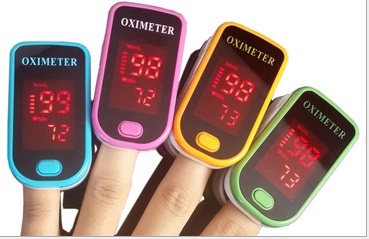
- Product name:Finger Clip OLED Oximeter
- Product code:CCM-WF
Packaging Specifications
- Outer Packaging Size:0.01 × 0.06 × 0.04 m
- Gross Weight:0.06 kg
- Net Weight:0 kg
- Volume:0
Description
Features
- Gravity sensor with multi-directional OLED display
- Low power consumption: Includes a battery power display; with two AAA batteries, it can operate continuously for 30–40 hours.
- Displays oxygen saturation (SpO2) and pulse rate (PR).
- Shows a volume waveform and the columnar strength of the pulse.
- Anti-interference design: Only requires battery replacement; no calibration needed.
- Compact, lightweight, and easy to operate/carry.
- Auto power-off: The device will shut down automatically after 8 seconds when no signal is detected.
- Built to medical testing standards for accurate measurement of blood oxygen and pulse rate values.
Usage Scenarios
- Clinical settings: Inside/outside the surgery, anesthesiology, pediatrics, emergency room
- Non-clinical settings: Oxygen bar, community health, sports health, and outdoor activities
- Note: This product is not recommended for use during movement or light use, and is not suitable for continuous patient monitoring.
Instructions
- Insert two AAA batteries into the compartment according to the positive and negative polarity markings, then replace the battery cover.
- Pinch open the finger clip pulse oximeter.
- Insert your finger fully into the rubber bore, then release the clip.
- Click the button on the front panel to power on.
- Keep your finger still during measurement; it is best not to move your body.
- Read the data directly from the display, which shows oxygen saturation, pulse rate, and pulse amplitude.
- After booting, the device defaults to gravity sensing mode, which automatically switches the display according to orientation. You can also switch to keypad mode.
Precautions
- Avoid exposure to direct sunlight.
- Avoid measuring while moving; keep fingers still.
- Avoid exposure to extreme infrared or ultraviolet radiation.
- Avoid contact with organic solvents, mist, dust, or corrosive gases.
- Keep away from radio frequency-emitting devices or sources of electrical noise, such as electronic surgical instruments, mobile phones, car two-way wireless communications equipment, and high-definition televisions.
- This device is not suitable for infants or newborns, only for children over 4 years old and adults.
- The most stable pulse rate waveform occurs after normalization; the reading at this time is the optimal and most standard value.
- The test subject's finger must be clean, free of nail polish or other cosmetics.
- Insert fingers into the rubber channel with fingernails facing up, aligned with the display direction.
no comments